This post is part of the Korean Apartment Homelab series.
Introduction
In my previous post, I wrote about how a bathroom wiring problem during a renovation led me down the path of building a homelab in my Korean apartment. What started as a simple Home Assistant setup on an Intel N100 mini PC has since grown into a full Proxmox server running more than a dozen services.
In this post, I want to walk through every service I currently run, explain why I chose each one, and share what has worked well and what hasn’t.
Infrastructure Overview
Everything runs on Proxmox, split between virtual machines and LXC containers.
I use VMs for services that benefit from full OS-level isolation or require specific hardware access. LXC containers handle everything else because they are significantly lighter on resources, which matters when you are trying to keep power consumption reasonable in an apartment.
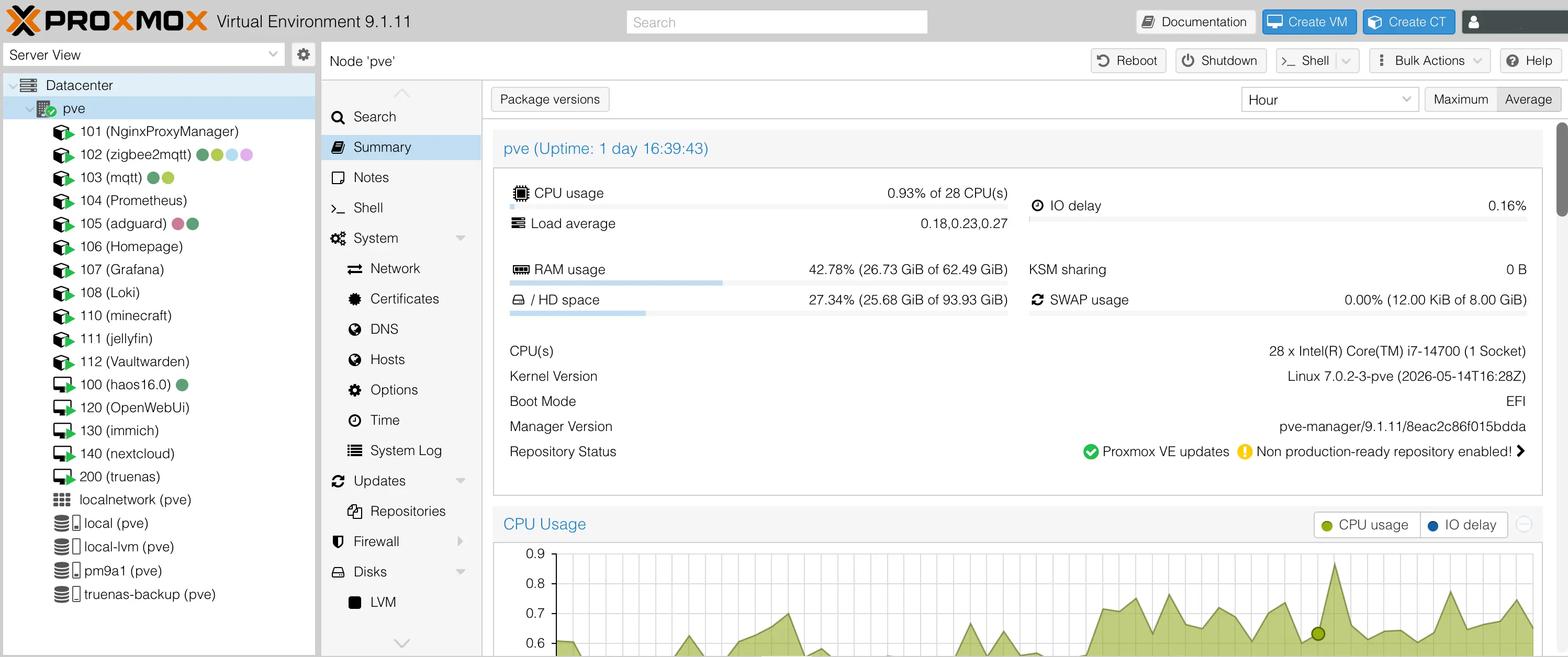
Virtual Machines
- Home Assistant
- Open WebUI
- Immich
- Nextcloud
- TrueNAS
LXC Containers
- Nginx Proxy Manager
- Zigbee2MQTT
- MQTT (Mosquitto)
- Prometheus
- AdGuard Home
- Homepage
- Grafana
- Loki
- Minecraft Server
- Jellyfin
- Vaultwarden
Core Services
Home Assistant
This is the service that started everything. If you want to unify all of your IoT devices under a single platform, there is really no alternative to Home Assistant. I have a long history with this program, and I plan to write about it in more detail in a future post. But if you are getting serious about home automation, Home Assistant will inevitably become your final destination.
Open WebUI
Open WebUI is a web-based chat interface that connects to local LLM backends. I run Gemma 4 E4B through LM Studio on my MacBook Pro (M1 Pro, 16GB), and Open WebUI connects to it as if it were an API server.
LM Studio has its own built-in chat, but it cannot search the internet or pull in external information during a conversation. Open WebUI solves that problem by supporting web search integration, which makes it far more practical for everyday use. For simple coding questions or quick research tasks, the combination of a locally running model with web-augmented chat has been surprisingly capable.
Immich
On my first server with only 512GB of storage, running a photo management service was never realistic. With the new server and its larger storage, I finally set up Immich. It is essentially a self-hosted Google Photos alternative, and the experience has been impressive so far.
The dilemma I currently face is that I also use iCloud on my iPhone. Limiting Immich to only camera photos feels like an unnecessary restriction, but fully committing to it while still paying for iCloud does not make much sense either. I am still working out the right approach.
Nextcloud
Nextcloud is more polished than I expected. As a personal cloud service, it handles file syncing, calendar, contacts, and document collaboration well enough that it genuinely feels like a viable alternative to commercial cloud storage.
TrueNAS
On my previous server, I used Xpenology, which is an unofficial port of Synology’s DSM. It worked, but every update came with anxiety about whether things would break. TrueNAS offered the reliability I needed. It is significantly more complex and less user-friendly than Xpenology, but the configurability and stability make the trade-off worthwhile. I run TrueNAS as a VM with the two enterprise HDDs passed through directly.
Networking and Access
Nginx Proxy Manager
When you want to access your self-hosted services from outside your home network, you generally have two options: connect through a VPN to your home network, or expose your services through a reverse proxy. Nginx Proxy Manager handles the second approach. It has been especially useful for Home Assistant, since being able to control home automation remotely is one of the main reasons I built this setup in the first place.
Zigbee2MQTT and MQTT
Anyone already running Home Assistant will be familiar with these. When I first started, I installed Zigbee2MQTT as an add-on inside Home Assistant, following guides from Korean Home Assistant communities. But as my device count grew, I realized that having Zigbee2MQTT crash inside Home Assistant could take down all of my IoT communications at once.
Moving Zigbee2MQTT and the MQTT broker (Mosquitto) into separate LXC containers was one of the best decisions I made. The setup is slightly less convenient, but the stability improvement has been significant.
AdGuard Home
I originally installed AdGuard Home for network-wide ad blocking, but honestly, I did not use it as much as I expected. Recently, I discovered that it can also serve as a local DNS resolver, which has renewed my interest in keeping it running.
Monitoring
Prometheus and Loki
These are relatively new additions to my stack. As the number of services grew, I needed better visibility into what was happening across the server. Prometheus collects metrics and Loki aggregates logs, giving me a solid foundation for troubleshooting and capacity planning.
Grafana
Grafana ties everything together by visualizing the data collected by Prometheus and Loki. While Homepage gives me a quick glance at service status, Grafana provides deep dashboards covering CPU, memory, disk I/O, and network usage across the entire system. More importantly, I configured Grafana to send alerts through Telegram, so I get notified immediately when something goes wrong.
Homepage
Homepage is a simple dashboard that lists all of my running services with quick-access links. Combined with Glances for basic system metrics, it gives me a convenient overview without needing to open Proxmox directly. The ironic part is that as a “homepage,” it is too dangerous to expose publicly, so I access it either through Cloudflare Access or over VPN.
Media and Other Services
Jellyfin
I installed Jellyfin as a replacement for Plex. I have not used it heavily yet, but so far I have not noticed any major drawbacks compared to Plex. The fact that it is completely free and open source is a nice bonus.
Minecraft Server
This one exists entirely because of my son. I currently run it with Paper and Geyser, which allows both Java and Bedrock clients to connect to the same server.
Vaultwarden
Vaultwarden is a lightweight, self-hosted implementation of Bitwarden. It replaces what I previously used 1Password for. Keeping my passwords stored on my own server gives me both peace of mind and full control over my data.
What Hasn’t Worked Well
The biggest challenge with self-hosting is competing against polished commercial services you already pay for.
Immich is a great example. The software itself is excellent, but when you already have iCloud deeply integrated into your daily workflow, switching over is not straightforward. The 2TB storage limitation on my current server makes this even harder, since a full photo library can easily exceed that.
I plan to gradually expand storage capacity, which should eventually make it realistic to reduce or eliminate iCloud costs. For now, Immich runs in parallel as a secondary backup.
Another general lesson is that self-hosted alternatives rarely match the convenience of their commercial counterparts on day one. The value comes over time, through customization, privacy, and cost savings, but the initial friction is real and worth acknowledging.
Lessons Learned
Moving from a simple N100 mini PC to a full Proxmox server brought a significant jump in capability, but also in complexity.
With more services running, reliability became much more important. That led me to add monitoring tools like Prometheus, Loki, and Grafana, which in turn added more things to maintain. It is a familiar cycle for anyone who has operated infrastructure professionally.
Power consumption also increased noticeably compared to the N100 setup. Managing electricity costs is now something I actively think about, especially since the server runs 24/7 in an apartment where every watt adds up.
Despite all of that, the satisfaction of running my own services outweighs the overhead. Having full control over my data, my automations, and my infrastructure makes the effort worthwhile.
Future Plans
There are a few areas I want to improve next:
10 Gigabit Networking. My current setup runs on 1Gbps, which is fine for most services but becomes a bottleneck when transferring large files between the server and other devices on the network. Upgrading to 10GbE internally is the next logical step, and I am also considering upgrading my internet connection to 5Gbps or 10Gbps.
Larger Storage. The 2TB mirrored HDD setup is already feeling tight. A larger NAS-grade drive upgrade would unlock better use of Immich, Jellyfin, and general file storage through Nextcloud and TrueNAS.
Backup Strategy. As the server becomes more critical to my daily life, having a proper off-site or secondary backup plan is increasingly important. This is something I have not yet implemented but need to prioritize.