This post is part of the Korean Apartment Homelab series.
Why I Built a Homelab in Seoul
I moved into my current apartment after a full interior renovation. During the renovation process, I discovered that the wiring inside the bathroom was different from the wiring connected to the bathroom switch box.
Fixing everything properly would have increased the renovation cost significantly, so there were some compromises I had to accept. At some point, I realized that IoT devices might help me work around some of those limitations.
At first, I used Samsung SmartThings for simple automation. Then I bought an Aqara smart door lock, and that was the moment everything changed for me. I suddenly realized how quickly things could become fragmented and difficult to manage across multiple ecosystems.
After researching alternatives, I came to the conclusion that Home Assistant could unify everything into a single platform.
That was the beginning of my homelab journey.
I bought a mini PC with an Intel N100 CPU from AliExpress and started running Home Assistant on it. Less than a year later, my “mini” server was no longer running a mini amount of services anymore.
What started as a simple Home Assistant setup gradually expanded into a much larger self-hosted environment.
Recently, I migrated everything to a new server. Unfortunately, it was also one of the worst possible times to build a PC because hardware prices had increased dramatically.
Space Constraints in Korean Apartments
Korean apartments have a somewhat unique structure compared to many homes overseas.
In many countries, opening the front door leads directly into the living space. In Korea, apartments usually have a small entrance area with a shoe cabinet, separated from the main living area by an additional sliding or swing door.
Modern Korean apartments often include a small storage room near the entrance. Interestingly, this is also where the apartment’s electrical and network connections usually enter the home.
That space turned out to be surprisingly suitable for a homelab.
It is isolated from the main living area, already contains electrical and communication wiring, and provides just enough room for networking equipment and a compact server setup.
Noise and Thermals
Noise was not a major concern because the server is installed inside the storage area near the entrance rather than inside the living room.
Thermals, however, were a completely different story.
The space is narrow and has limited airflow, so cooling became extremely important. I could have used a smaller cooler, similar to what I used with the N100 mini PC, but this time I wanted both performance and long-term stability.
I eventually chose the DeepCool AK620 G2 Digital NYX.
Looking back, I made a slightly unnecessary purchase decision there. I was building a server, not a gaming PC, but I still bought the more expensive model with a built-in display.
In practice, it does not matter much because I simply do not use the display feature. Since the system runs Proxmox, I would not realistically be able to use that screen functionality anyway.
At least the cooling performance itself has been excellent.
Power Usage Concerns
Power consumption was one of the biggest considerations for this build.
I could have saved money by using older enterprise-grade server hardware, but most server components consume significantly more power, especially when running 24/7 in an apartment environment.
At the same time, I needed enough performance to run multiple services simultaneously, so choosing the right balance was not easy.
Eventually, I settled on the Intel i7-14700.
Even though it is now considered a previous-generation CPU, its price increased significantly in Korea. My guess is that many people wanted a high-performance platform that could still use DDR4 memory, especially because DDR5 prices had become extremely expensive.
Internet and Network Setup
Right now, I use a 1Gbps internet connection, although I have been considering upgrading to 5Gbps or even 10Gbps in the future.
My internal network is built entirely around UniFi equipment.
The main gateway is a UniFi Cloud Gateway Fiber, connected to UniFi switches and access points throughout the apartment.
So far, the setup has been stable and easy to manage.
My Current Hardware Stack
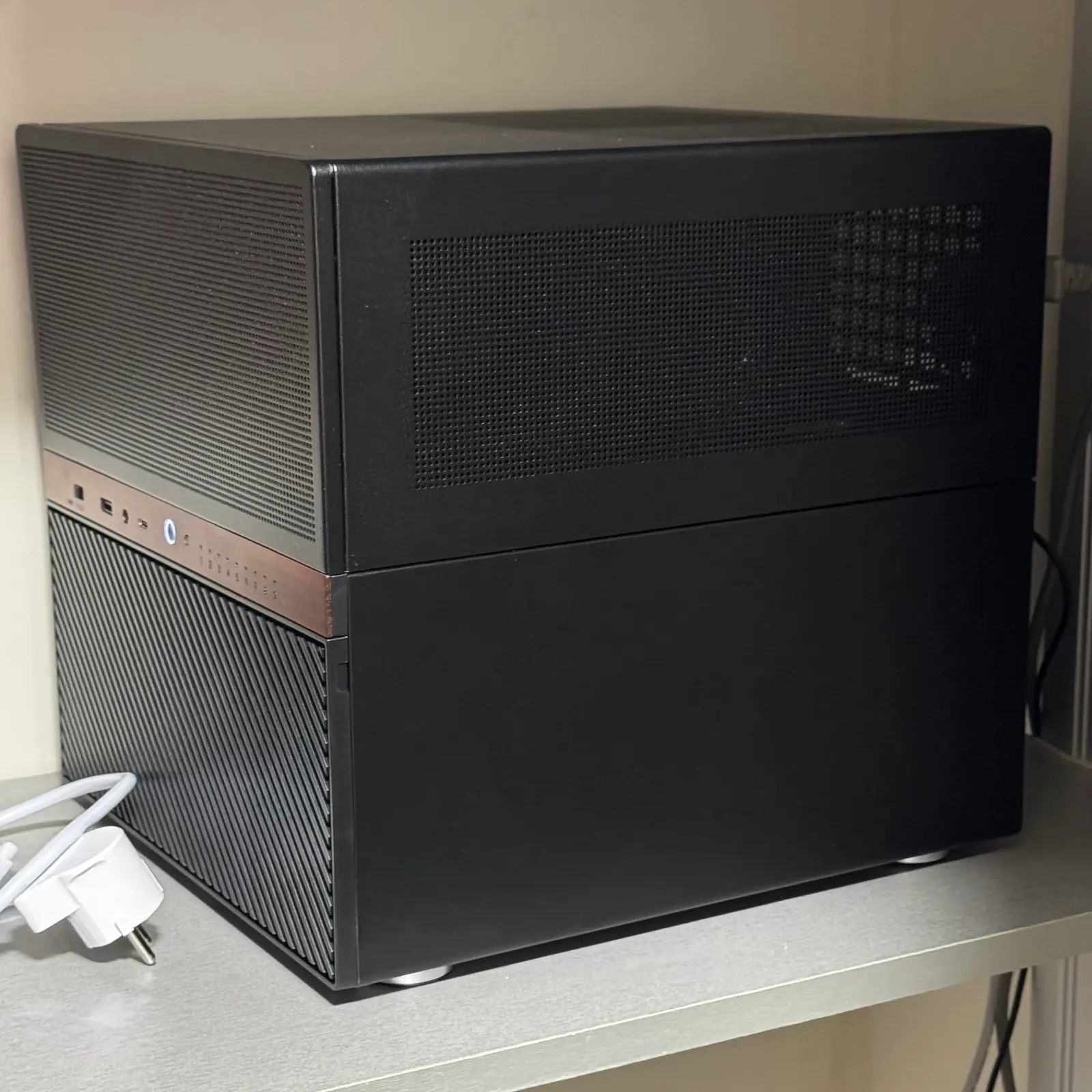
Here is the current server configuration running my homelab:
- CPU: Intel i7-14700
- RAM: Samsung DDR4 64GB (32GB ×2)
- Motherboard: MSI PRO B760M-A DDR4 II
- Power Supply: Corsair SF750 ATX 3.1
- CPU Cooler: DeepCool AK620 G2 Digital NYX
- HDD: HGST Enterprise 2TB ×2
- NVMe SSD (VM/LXC): Samsung PM9A1 1TB
- NVMe SSD (Proxmox OS): SK hynix P31 1TB
- CASE: Jonsbo N6
The server currently runs Proxmox along with multiple self-hosted services including:
- Home Assistant
- Zigbee2MQTT
- MQTT
- Nextcloud
- Jellyfin
- Immich
- Vaultwarden
- Open WebUI
- Minecraft server
- AdGuard Home
Lessons Learned
Looking back, I probably spent more money than necessary on the CPU cooler. That is one of the few parts I slightly regret.
Overall, however, I think the build turned out well considering the insane DDR5 prices at the time.
I probably could have saved money by buying a used CPU, but there were almost no second-hand i7-14700 listings available in Korea when I built the system.
I originally thought 64GB of RAM might be excessive, but the server already uses more than 60% of it regularly, so I am glad I went with 32GB ×2 from the beginning.
Storage has also become surprisingly expensive. I reused the enterprise HDDs I already owned, but 2TB feels very limiting today. Fortunately, having two drives still allowed me to configure a mirrored setup.
If I were building this again today, I would definitely choose larger drives from the start.
This homelab started with a simple smart home problem and slowly evolved into something much larger than I originally expected.